Florida’s springs, reefs, and wrecks offer some of the clearest snorkeling in the United States, but capturing those moments isn’t as simple as grabbing any waterproof camera. Between the bright sunlight, sandy shallows, and deep blue offshore ledges, you need a device that handles specific lighting conditions and saltwater exposure without breaking your budget. Whether you’re planning a trip to the Florida Keys, a freshwater spring in the Panhandle, or a drift snorkel along the Gulf Coast, this guide walks you through the exact features that matter, the trade-offs you’ll face, and how to match a camera to your skill level.
What Makes Florida Snorkeling Different for Cameras?
Florida’s underwater environments are not uniform. A camera that performs well in a crystal-clear spring may struggle in the open ocean where visibility drops and light behaves differently. Understanding these conditions is the first step in choosing the right gear.
Freshwater Springs vs. Saltwater Reefs
Freshwater springs like those in Crystal River or Ginnie Springs have constant 72-degree water and exceptional visibility, often exceeding 100 feet. The main challenge here is color temperature—the water tends to have a greenish-blue tint that requires manual white balance adjustments. Saltwater reefs, on the other hand, offer vibrant colors but introduce salt corrosion risks and stronger currents. A camera that handles both environments needs robust housing seals and adjustable color settings.
Light and Depth Considerations
Most Florida snorkeling happens in water shallower than 15 feet, which means natural light is usually sufficient. However, on overcast days or when snorkeling deeper reef ledges, colors drop off quickly. Red and orange wavelengths disappear first, leaving everything looking blue or gray. This is where a camera with good low-light performance or an optional color-correction filter becomes valuable.
Key Features to Look for in a Snorkeling Camera
Not all waterproof cameras are created equal. While action cameras dominate the market, some compact point-and-shoots still hold their own for snorkeling. Here’s what to prioritize when comparing options.
Waterproof Rating and Depth Rating
Look for a camera rated to at least 30 feet (10 meters) without an external housing. This covers virtually all snorkeling scenarios in Florida. Some action cameras claim 130-foot ratings, which is fine, but remember that deeper ratings don’t improve image quality at snorkeling depths—they just add a safety margin. What matters more is the quality of the seals and whether the battery door stays secure after repeated openings.
Image Stabilization
Snorkeling involves constant movement from currents, waves, and your own breathing. Electronic image stabilization (EIS) is essential for smooth video, while optical stabilization helps with still photos. Without stabilization, even calm-water footage looks shaky and unprofessional. This is especially important when snorkeling in the Gulf where gentle swells are common.
White Balance and Color Correction
Most cameras have automatic white balance, but it often fails underwater. Look for a camera with manual white balance presets or underwater-specific modes. Some action cameras allow you to set a custom white balance by pointing at a white surface underwater—this is a game-changer for Florida’s tannin-stained rivers and blue springs. If a camera lacks manual controls, consider buying a red filter attachment that clips over the lens.
Battery Life and Storage
Florida snorkeling trips often involve multiple stops—a spring in the morning, a beach in the afternoon. Battery life becomes critical. Cameras with removable batteries let you carry spares, while built-in batteries require recharging between dives. Also, check whether the camera supports high-capacity microSD cards (256GB or more) so you don’t run out of space during a long day on the water.
Action Cameras vs. Compact Waterproof Cameras
The biggest decision you’ll make is choosing between an action camera and a traditional waterproof compact. Both have strengths, and the right choice depends on how you plan to use the footage.
Action Cameras: Best for Video and Versatility
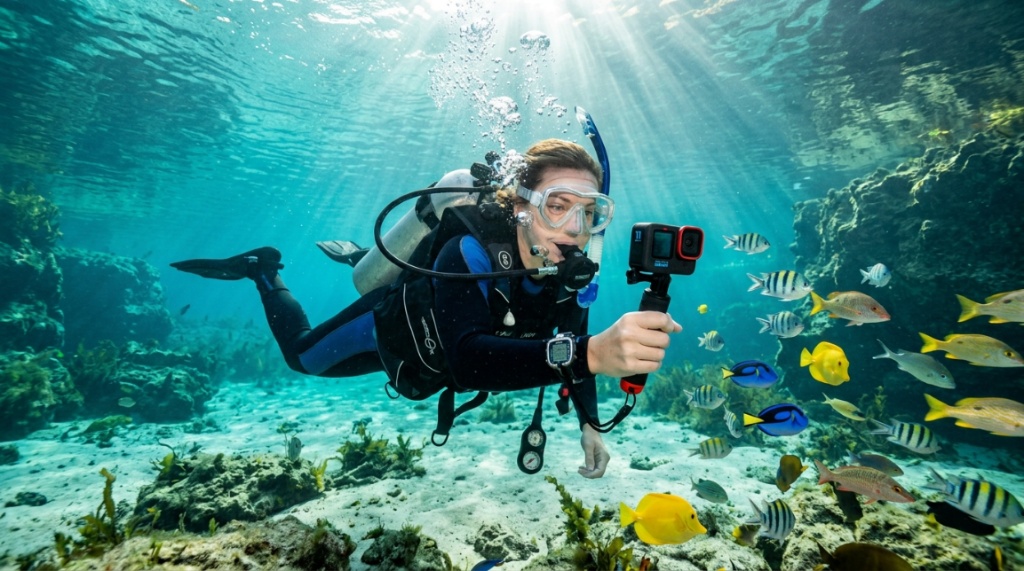
Action cameras like the GoPro Hero series or DJI Osmo Action are the default choice for most snorkelers. They offer wide-angle lenses that capture more of the reef, excellent stabilization, and a vast ecosystem of mounts. You can attach them to a mask strap, a handheld tray, or a floating grip. The downsides include a smaller sensor that struggles in low light and a tendency to overheat in direct Florida sun when recording 4K for extended periods.
Compact Waterproof Cameras: Better for Still Photos
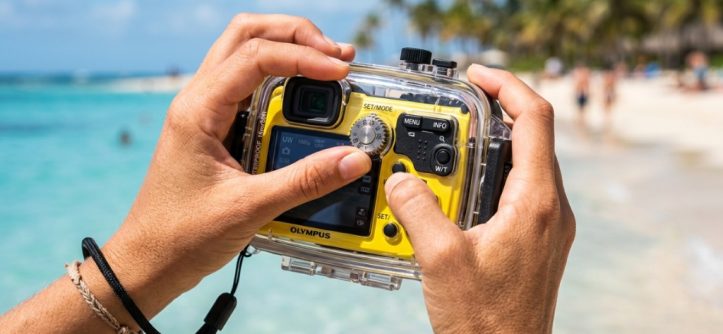
Cameras like the Olympus Tough TG-7 or Ricoh WG-6 have larger sensors and optical zoom, which produces sharper still photos with better color depth. They also have built-in macro modes for capturing tiny sea creatures like nudibranchs or juvenile angelfish. The trade-off is bulkier size and less versatile mounting options. If your primary goal is photography rather than video, a compact may serve you better.
Which One Should You Choose?
If you want to share video clips on social media or capture hands-free footage, go with an action camera. If you’re more interested in high-quality still images and don’t mind holding a camera in your hand, choose a compact waterproof model. For most casual snorkelers, an action camera is the more practical and affordable choice, especially when you factor in the cost of accessories.
For a detailed breakdown of the best waterproof action cameras suited to Florida’s conditions, check out this snorkeling camera for Florida guide that compares top models side by side.
Essential Accessories for Florida Snorkeling
Your camera is only part of the equation. The right accessories can mean the difference between great footage and a frustrating day on the water.
Floating Handles and Wrist Straps
Dropping a camera in 40 feet of water is a trip-ending mistake. A bright orange floating handle not only keeps your camera buoyant but also provides a more stable grip than holding the camera body directly. Wrist straps are a backup but can be uncomfortable when wearing thick neoprene gloves in cooler spring water.
Anti-Fog Inserts
If you’re using a camera with a protective housing, temperature changes between the warm air and cool water will cause fogging. Anti-fog inserts absorb moisture and prevent this issue. They’re cheap, reusable, and worth carrying even on sunny days.
Red Filters and Color-Correction Lenses
For reef snorkeling in water deeper than 10 feet, a red filter restores natural colors by compensating for the red light that water absorbs. Many action cameras have flip-up filters that you can switch between shallow and deep conditions. In springs, a magenta filter works better because the water has a green tint. Research the specific water body you’re visiting to choose the right filter.
Spare Batteries and Memory Cards
Cold water drains batteries faster than air, and Florida’s springs are a constant 72 degrees—cold enough to noticeably reduce battery life. Carry at least one spare battery and a small waterproof case for extra memory cards. This is a simple step that prevents the frustration of running out of storage halfway through a manatee encounter.
Common Mistakes to Avoid When Buying a Snorkeling Camera
Many snorkelers make avoidable mistakes when purchasing their first underwater camera. Here are the most common ones and how to steer clear of them.
Ignoring the Touchscreen Underwater
Some cameras have touchscreens that become unresponsive when wet. This is a major usability issue because you’ll need to change settings while in the water. Look for cameras with physical buttons that are easy to press with wet hands, or models with a dedicated underwater mode that locks the touchscreen and uses side buttons instead.
Choosing a Camera Without a Wide-Angle Lens
Snorkeling is a wide-open environment. A narrow field of view makes it difficult to capture large reef structures or schools of fish. Most action cameras have a 120-degree or wider field of view, but some compact cameras default to a narrower zoom range. Check the field of view specification before buying.
Overlooking the Importance of a Good Housing Seal
Saltwater is unforgiving. A single grain of sand on a housing seal can cause a leak that destroys your camera. Before every trip, inspect the rubber gasket for debris or cracks and apply a thin layer of silicone grease if recommended by the manufacturer. This takes two minutes and can save you hundreds of dollars.
Buying Based on Megapixels Alone
Megapixels are the most misunderstood specification in digital photography. A 12-megapixel camera with a large sensor will produce better images than a 20-megapixel camera with a tiny sensor, especially in low light. Focus on sensor size, lens quality, and image processing rather than pixel count.
How to Set Up Your Camera for Florida Conditions
Once you have your camera, proper setup ensures you capture the best possible footage on your first trip.
Step-by-Step Setup Guide
- Set white balance manually: In clear ocean water, use the underwater mode or set a custom white balance at 10 feet depth. In springs, adjust toward magenta to counteract the green tint.
- Choose the right resolution: For most uses, 1080p at 60fps is ideal. It provides smooth motion and uses less storage than 4K. Use 4K only if you plan to crop or zoom during editing.
- Enable stabilization: Turn on electronic image stabilization before entering the water. This is more effective than trying to stabilize footage in post-production.
- Set a quick-release mount: Attach your camera to a floating handle or mask mount before getting in the water. Fumbling with mounts while floating is difficult and risks dropping your gear.
- Test the seals: Before your trip, submerge the camera in a bucket of fresh water for 10 minutes to verify the seals are working properly.
Video Settings for Different Florida Locations
For the Florida Keys, where water is clear and blue, use a slightly cooler white balance to preserve the natural blue tones. For springs like Weeki Wachee, where the water has a greenish tint, adjust toward magenta. For beach snorkeling near shore where sand particles are suspended, increase the shutter speed to reduce blur from moving particles.
Budget Considerations and Where to Save
Prices for snorkeling cameras range from under $100 to over $500. Understanding where to spend and where to save helps you get the best value.
Entry-Level Options (Under $150)
Budget action cameras like the AKASO Brave series or Campark models offer 4K video and basic stabilization at a fraction of the cost of premium brands. They’re perfectly adequate for casual snorkelers who want shareable footage without professional quality. The main compromises are weaker low-light performance and less durable construction, For more insights on selecting durable outdoor tech and electronics suited for unpredictable coastal and marine environments, check out this guide What do Wind Turbines, CCTV Cameras, Air
Mid-Range Options ($150–$300)
This is the sweet spot for most snorkelers. Cameras like the GoPro Hero 11 Black (when on sale) or the DJI Osmo Action 3 offer excellent stabilization, good color science, and reliable waterproofing. You get most of the premium features without the flagship price tag.
Premium Options ($300+)
Flagship action cameras and high-end compacts like the Olympus TG-7 justify their price with superior sensors, better low-light performance, and more robust build quality. If you snorkel frequently or plan to use the camera for other outdoor activities, the investment is worthwhile.
Where to Save Money
Skip expensive branded accessories like mounts and cases—third-party options work just as well. Also, consider buying a previous-generation model when a new one launches. The performance difference between generations is often minimal for snorkeling use.
Frequently Asked Questions
Do I need a waterproof housing for snorkeling?
No, if your camera is rated waterproof to at least 30 feet without a housing. Most modern action cameras and many compacts meet this standard. A housing adds protection but also bulk and cost. Only use a housing if you plan to dive deeper than the camera’s rated depth or want extra protection against sand and impacts.
Can I use my phone for snorkeling photos?
Yes, with a waterproof phone pouch or case, but the results are usually inferior to a dedicated camera. Phones lack physical buttons that work underwater, have poor white balance in aquatic environments, and the touchscreen becomes unresponsive. For casual shots near the surface, a phone pouch works fine, but for serious snorkeling, a dedicated camera is better.
What is the best resolution for snorkeling video?
1080p at 60fps is the best balance of quality, storage, and battery life for most snorkelers. 4K provides more detail but uses significantly more storage and battery. Choose 4K only if you plan to crop footage or produce high-resolution edits.
How do I prevent my camera from fogging up?
Use anti-fog inserts inside the housing, avoid opening the housing in humid conditions, and let the camera acclimate to the water temperature before diving. The main cause of fogging is temperature difference between warm air inside the housing and cool water outside.
Is a red filter necessary for Florida snorkeling?
In water deeper than 10 feet, yes. Red filters restore colors that water absorbs, making footage look natural instead of blue. In shallow spring water, a magenta filter is more effective. For surface snorkeling in clear, shallow water, you can skip the filter and adjust white balance instead.
Conclusion
Choosing the right snorkeling camera for Florida waters comes down to understanding your priorities: video versus stills, budget versus performance, and the specific environments you plan to explore. Action cameras offer versatility and ease of use, while compact waterproof cameras deliver superior photo quality. Regardless of which type you choose, prioritize image stabilization, manual white balance controls, and reliable waterproofing rated for at least 30 feet. Pair your camera with a floating handle, anti-fog inserts, and spare batteries, and you’ll be ready to capture everything from manatee encounters in Crystal River to vibrant reef life in the Keys. Take time to set up your camera before you hit the water, and don’t forget to test the seals—a few minutes of preparation can save your gear and your memories.